Learn how to turn on Automatic Login in Ubuntu Linux’s Login Window program which let you set which user account you want to automatically login to Ubuntu every time Ubuntu Linux starts up. Automatic login will save you time by not having to type in your password every time you boot into Ubuntu, but Automatic Login’s are less secure.
Login with an administrator account in Ubuntu.
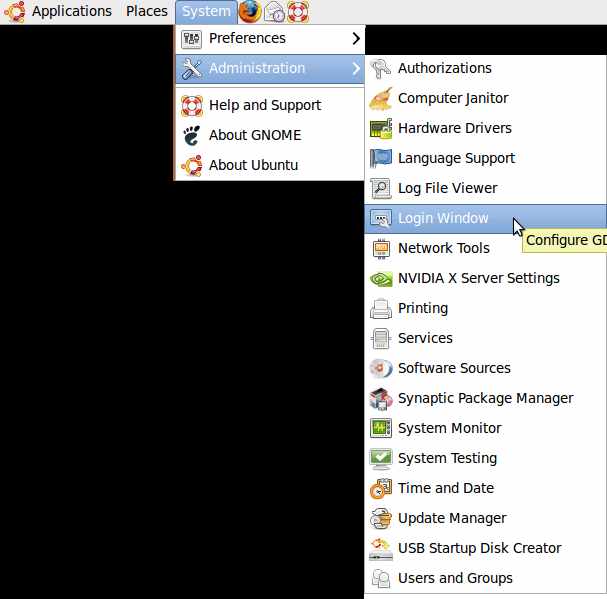
1. Go to Systems > Administration > Login window
2. Click on the Security tab. Check the Enable automatic Login check box. Pick the user you want to login automatically. Try to avoid having an administrator login automatically since admin accounts have the most power, so someone can use the account to install something bad. I recommend making a guest account login automatically.
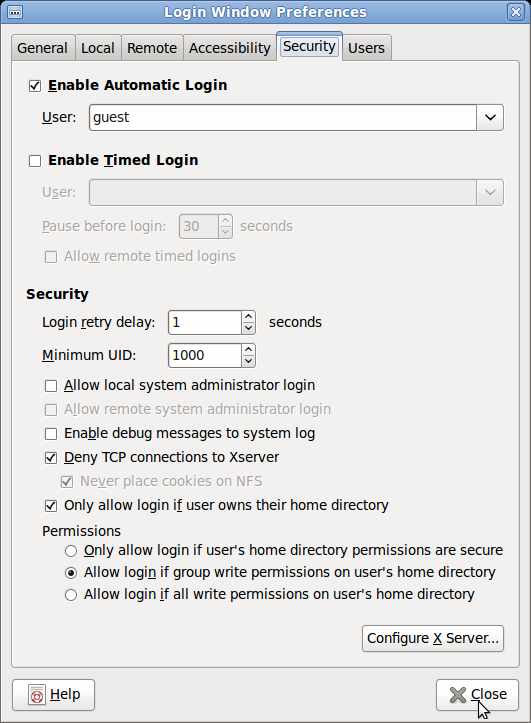
3. Click close when done.