I will show you how to install FileZilla FTP client which lets you connect your Ubuntu Linux computer to your webhosting server where your website is located. You can use FileZilla FTP client to upload, delete, rename files and change the chmod file and folder permissions for your files and folders on your Web hosting server.
Login as an administrator in Ubuntu.
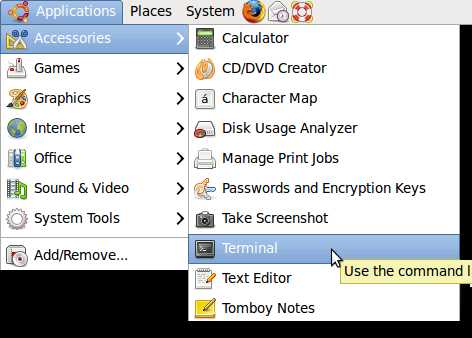
1. Open the Terminal Command Prompt by going to Applications > Accessories > Terminal
2. In Terminal, type sudo aptitude install filezilla
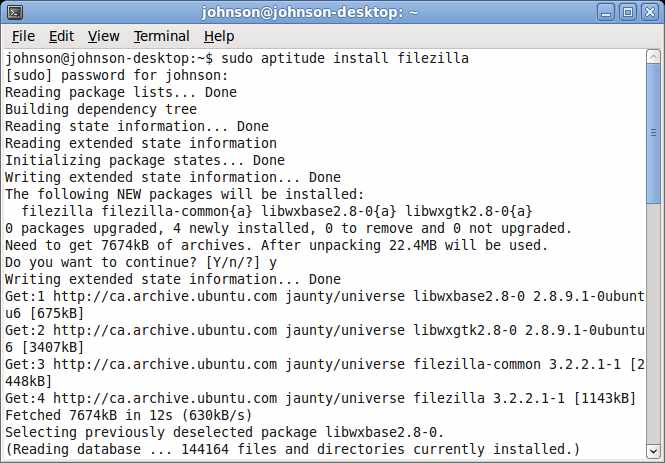
3. then press Y and enter when you see this question in Terminal “sudo aptitude install filezilla”
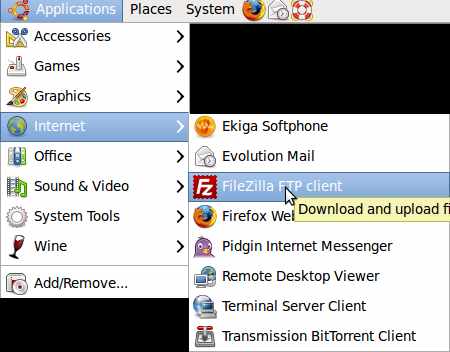
4. FileZilla is located at Applications > Internet > FileZilla FTP Client
i cut and pasted sudo aptitude install filezilla
into terminal and heres the output
simontemplar@simontemplar-desktop:~$ sudo aptitude install filezilla
Reading package lists… Done
Building dependency tree
Reading state information… Done
Reading extended state information
Initializing package states… Done
Couldn’t find any package whose name or description matched “filezilla”
Couldn’t find any package whose name or description matched “filezilla”
No packages will be installed, upgraded, or removed.
0 packages upgraded, 0 newly installed, 0 to remove and 0 not upgraded.
Need to get 0B of archives. After unpacking 0B will be used.
Reading package lists… Done
Building dependency tree
Reading state information… Done
Reading extended state information
Initializing package states… Done
I’ve donloaded filezilla for linux from the main site do I put that somewhere before executing this command?
You can try using these commands to install FileZilla:
sudo apt-get update
sudo apt-get install filezilla
You can also check out the Ubuntu package site at http://packages.ubuntu.com/precise/filezilla for FileZilla to learn more about how to download its package.